
March 2, 2026 • 13 min read
eBPF Observability Overload: You Are Paying to Monitor Noise
eBPF telemetry can become a costly, high-overhead noise source unless you scope, sample, and filter at the node boundary.
At 2am, one of our production nodes looked like it was trying to take off.
Nothing was “down.” No alerts were firing. Latency was fine. But a handful of Kubernetes workers had their CPUs pinned in a way that didn’t match any application workload we ran. The usual suspects were innocent: no runaway pods, no bad deploy, no noisy neighbor.
Then I looked at the host metrics and saw it: softirq time climbing like a staircase.
And right next to it, a brand new DaemonSet we’d rolled out earlier that day. It was supposed to help us “see everything” in the network.
It did.
It also taught me a lesson I keep repeating to platform teams: observability that’s easy to turn on is often expensive to leave on.
Why this problem matters
eBPF is genuinely powerful. It gives you visibility at the kernel boundary where traditional agents have always been blind. You can attach to syscall paths, trace TCP lifecycle events, observe DNS behavior, and map service dependencies without rewriting your apps.
That’s the pitch.
The reality, in many fleets, is different: you deploy a turnkey eBPF agent, ingest a firehose of telemetry, and discover you’ve built a machine that converts kernel events into billing events. You pay in three currencies at once:
-
Performance: kernel and networking overhead that shows up as softirq CPU, packet drops, and scheduler contention.
-
Complexity: more moving parts inside the node, more failure modes, and harder incident triage because the “observer” becomes part of the system.
-
Cost: ingestion-based pricing that punishes high cardinality and high volume, especially when the data is mostly internal background noise.
If you are running a large Kubernetes fleet, you don’t need to be making mistakes at kernel speed.
The system context and constraints
Here’s the context I’m assuming, because it’s the common one in DevOps and platform teams:
-
We run Kubernetes across multiple clusters, autoscaling is aggressive, and nodes are a mix of general compute and latency-sensitive services.
-
We already have “normal” observability: application metrics, tracing for key services, logs shipped to a central platform, and basic host metrics.
-
We have compliance constraints. Production nodes are locked down. We don’t want random privileged workloads running unsupervised.
-
We do not have a dedicated observability engineering team that can spend weeks crafting BPF programs and maintaining telemetry pipelines. We are a platform team, not a kernel team.
-
And we are paying a SaaS provider for ingestion, not a fixed-price license.
These constraints matter because eBPF observability is not a product decision. It’s an architecture decision.
The naive approach that sounds reasonable
The naive approach is the one vendors and blog posts accidentally teach you:
-
Deploy an eBPF network mapper to every production node.
-
Let it auto-discover every flow, every DNS query, every connection attempt.
-
Ship it all to your observability platform.
-
Enjoy the dependency graph.
The operational appeal is obvious. You get visibility without touching application code. You can find unknown callers. You can detect weird lateral movement. You can build service maps automatically.
If you’ve ever chased a “who is calling this endpoint?” mystery for hours, the promise feels like relief.
So we did it.
We rolled out a DaemonSet with the required privileges, enabled network flow and DNS visibility, and watched the dashboards light up.
For a brief moment, it felt like we’d unlocked a cheat code.
Where it breaks
It broke in a very familiar way: nothing was broken until everything was expensive.
The first signal was node performance. A subset of workers started showing elevated CPU in kernel space, not user space. On Linux, that typically means interrupts, networking, or heavy kernel work.
Softirq time was the giveaway.
Softirqs are a mechanism the kernel uses to handle deferred work from hardware interrupts, often networking related. When you see softirq CPU spiking, it’s usually because the kernel is spending significant time processing packets or network events.
An eBPF agent that hooks into network events can increase that work. Not always disastrously. But enough to show up when the node is busy and the fleet is large.
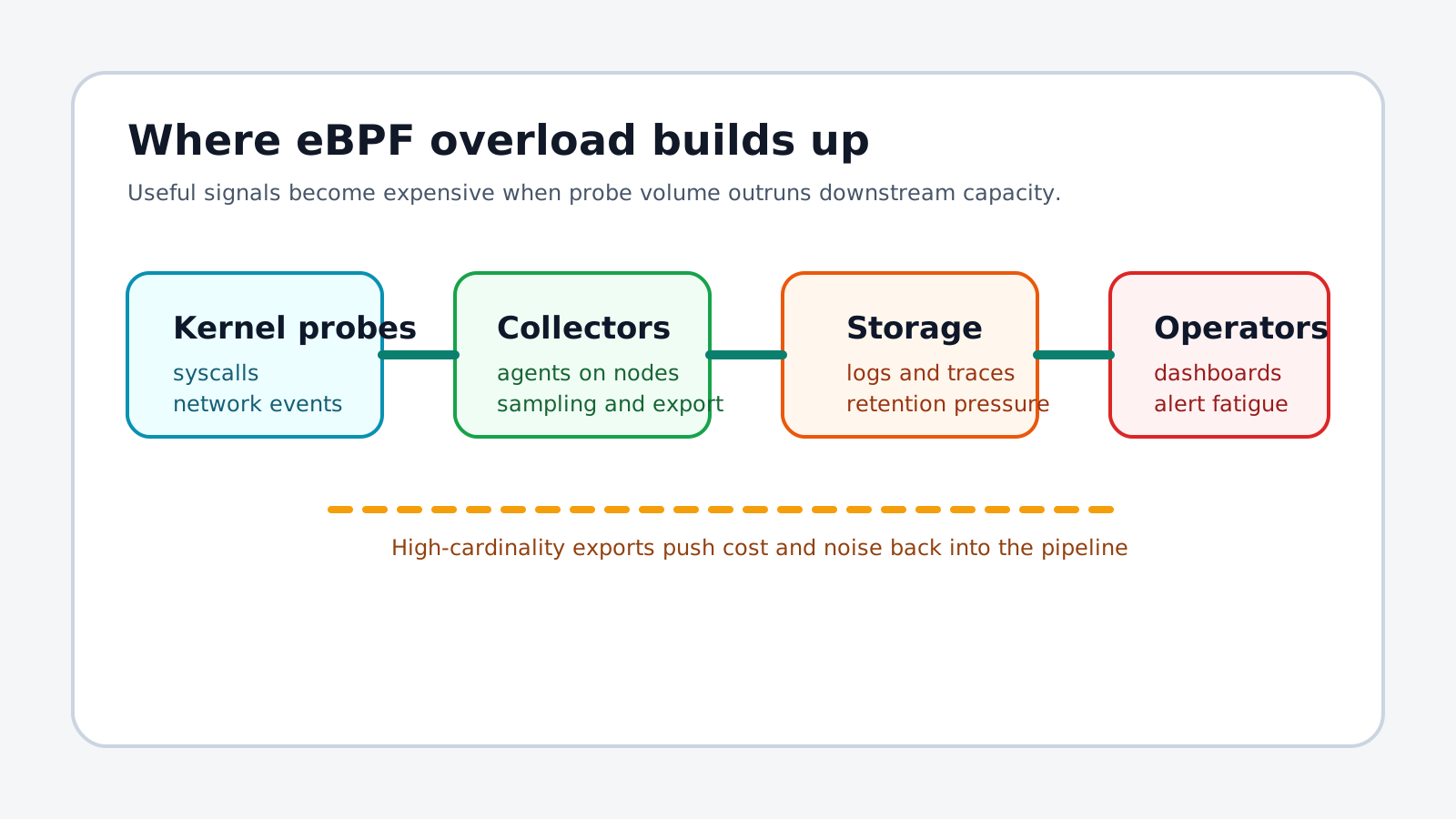
The second signal was egress. Telemetry didn’t just increase. It multiplied, because we had instrumented the busiest part of the system.
Most production environments have a shocking amount of internal network chatter:
DNS queries, retries, health checks, service discovery, sidecar behavior, cache misses, connection churn from short-lived pods, and the background noise of distributed systems trying to stay alive.
If you ship all of that, continuously, you are choosing to pay for it.
The third signal was the bill.
I’m not going to invent exact numbers or claim your pricing model will match ours, but I will describe the pattern: a large ingestion increase that correlated directly with enabling DNS visibility and per-flow telemetry across the fleet.
The worst part was the mismatch between value and volume. The expensive data was not the high-signal stuff. It was the internal, repetitive, high-frequency noise.
You don’t want a dependency map of your DNS resolver. You want to debug an outage.
The real-world failure moment
The most painful moment wasn’t the bill itself. It was realizing why it happened.
We had turned on visibility for internal DNS queries and network flows at full fidelity.
In a Kubernetes fleet, internal DNS is relentless. Every service discovery, every library doing its own lookup, every retry storm, every liveness probe that resolves a name, all of it produces events. When the agent records these at high cardinality and ships them out, you have created the perfect ingestion amplifier.
It wasn’t malicious. It wasn’t a bug. It was exactly what we asked the system to do.
We asked to see everything.
The system obliged.
First attempts and dead ends
We tried the obvious “quick fixes” first, and they mostly failed.
We reduced dashboards. That did nothing. Ingestion happens before dashboards.
We adjusted retention. That reduced storage costs but not ingestion costs.
We tried to filter in the SaaS platform. That helped after the data arrived, but the costs were already incurred and the pipeline still had to transport and process it.
We changed sampling in the backend. Again, too late.
We looked for a magical “low overhead mode.” It existed in marketing, not in physics.
The dead end here is common: people assume observability is a post-processing problem. With eBPF, it is very often a collection problem.
If you don’t control what leaves the node, you don’t control cost or blast radius.
The key insight
The turning point was a simple reframing:
We were treating eBPF as a continuous telemetry generator.
We should have treated it as a point-in-time microscope.
eBPF is code running in your kernel. That has two implications:
-
Overhead is real, and it competes with your workloads.
-
Raw event volume is unbounded, because the kernel does not politely limit how chatty your distributed system can be.
So the question becomes: what is the minimum telemetry we need, at the node, to answer the questions we actually ask during incidents?
Not “What flows exist?”
But “Which flows matter right now?”
Not “What does DNS look like in general?”
But “Is DNS the reason this request is slow?”
Once we started thinking that way, the architecture changed.
A better pattern: sampling and filtering at the source
There are two broad patterns that work well in practice:
-
First, use eBPF for targeted debugging workflows, not for perpetual full-fidelity collection.
-
Second, when you do collect continuously, sample at the source and aggressively filter before exporting.
The key is that filtering must happen inside the node boundary, before the data becomes an ingestion event.
This is where people underestimate effort. Source filtering is not a toggle. It’s a product you build, or you adopt a tool that genuinely supports it.
Here’s a practical workflow that kept us sane.
Implementation walkthrough
Step 1: change the default posture
We stopped deploying the full eBPF observability agent everywhere by default.
Instead, we created two deployment modes:
-
Baseline mode, enabled fleet-wide, with conservative metrics only.
-
Debug mode, enabled on demand, with higher fidelity tracing limited to specific nodes, namespaces, or pods.
Baseline mode should be boring. Its job is to detect anomalies and tell you where to look, not to explain every packet.
Debug mode should be powerful and temporary.
Step 2: scope debug mode to a small blast radius
We used node labeling and a separate DaemonSet for debug mode. The important part was not the Kubernetes YAML. It was the operational discipline around it.
Only nodes with an explicit label would run debug mode.
The label would be applied during an incident, and removed afterward.
Here is what the basic shape looks like:
apiVersion: apps/v1
kind: DaemonSet
metadata:
  name: ebpf-debug-agent
  namespace: observability
spec:
  selector:
    matchLabels:
      app: ebpf-debug-agent
  template:
    metadata:
      labels:
        app: ebpf-debug-agent
    spec:
      nodeSelector:
        observability.mycorp.com/ebpf-debug: "true"
      hostNetwork: true
      hostPID: true
      containers:
        - name: agent
          image: my-ebpf-agent:debug
          securityContext:
            privileged: true
          env:
            - name: EXPORT_MODE
              value: "SAMPLED"
This approach trades convenience for control. You can’t “see everything” at all times. You can, however, avoid turning your fleet into a telemetry generator.
Step 3: sample early and deliberately
Sampling is not just “keep 1% of events.” Sampling has to align to questions.
For example, if you’re interested in p95 latency regressions, sampling should preserve rare slow events.
If you’re investigating a suspected DNS issue, you want DNS telemetry, but only for impacted namespaces and only for slow lookups.
That suggests dynamic sampling rules.
Some agents let you configure this. Some don’t. If yours doesn’t, you’ll end up building an awkward set of compromises.
Even with vendor tooling, I recommend a mental model: sample by intent, not by volume.
Step 4: treat DNS and flows as special cases
DNS telemetry is uniquely dangerous because it is both high-frequency and high-value during incidents.
So we applied strict defaults:
-
No fleet-wide per-query DNS events shipped externally.
-
Only aggregated counters by node and namespace in baseline mode.
-
In debug mode, per-query events were allowed, but constrained to specific namespaces and capped in rate.
The cap matters. Without it, a retry storm can turn your debug agent into a denial of wallet event.
Step 5: add a kill switch that ops can use
If your observability tool can harm production nodes, you need a fast rollback path.
We implemented two kill switches:
-
A feature flag in the agent config that could disable high-cost probes without redeploying.
-
A Kubernetes mechanism that allowed us to remove the debug label from all nodes quickly.
In practice, the second one mattered most. During an incident, you want a one-liner that reduces blast radius.
Validation: what we measured before and after
We validated the change like we validate most platform changes: by measuring the things that hurt last time.
-
We watched softirq CPU before and after enabling debug mode on a subset of nodes.
-
We measured agent CPU and memory. Not as an average, but as a worst-case under load.
-
We tracked egress volume from nodes in baseline mode versus debug mode.
-
We compared ingestion volume on the observability platform, specifically for DNS-related telemetry.
-
We also tested operationally: could an on-call engineer enable debug mode safely and disable it quickly?
The best result wasn’t a number. It was a feeling: the fleet stopped behaving like it was permanently under a microscope.
Debug visibility became something we turned on for a reason, then turned off again.
Tradeoffs and alternatives considered
This pattern is not free. You are trading away some things.
You lose always-on global service maps. That might be acceptable if your service ownership is clear and your tracing is decent.
You add operational steps for on-call. You need runbooks, access control, and guardrails.
You might miss rare issues that happen outside your debug window. That’s the cost of not paying for everything.
We considered three alternatives:
-
First, keep full eBPF telemetry everywhere and try to control cost in the backend. This was rejected because it does not address node overhead or ingestion amplification.
-
Second, build a dedicated telemetry filtering pipeline at the node level, effectively treating eBPF as a raw signal source and running a local reducer. This is viable, but it is a real engineering project. If you have an observability team, it can be the best option.
-
Third, avoid eBPF for continuous observability and invest in application-level instrumentation and targeted host metrics. For many teams, this is the right default. eBPF becomes the escalation tool, not the baseline tool.
Our choice ended up being a hybrid: baseline host and application telemetry everywhere, with eBPF used surgically.
Production hardening and edge cases
There are a few operational concerns that deserve respect.
Privileged workloads: eBPF agents often require elevated privileges. Treat that as a security boundary. Lock down who can deploy and configure them. Audit changes.
Kernel compatibility: eBPF behavior and available hooks can vary by kernel version. If your fleet has heterogeneous kernels, expect weirdness. Test on the oldest supported kernel, not your newest.
Failure modes: an agent crash can be noisy but survivable. An agent that loops or overloads softirq can degrade the node. Design your rollout strategy accordingly. Canary nodes, small percentages, and fast rollback.
Autoscaling interactions: noisy nodes can trigger scaling, which adds nodes, which adds agents, which increases telemetry. Be careful with feedback loops. Observe the observer.
Data governance: network telemetry can contain sensitive information, depending on what you capture. Be explicit about what you record, where it goes, and who can access it.
Developer experience: if engineers come to rely on always-on magical maps, they will be unhappy when you constrain it. You need to explain why and offer a clear workflow for getting the visibility they need during incidents.
Lessons learned
The durable lessons were not about eBPF itself. They were about engineering incentives.
First, observability tools tend to optimize for onboarding, not long-term cost. The easiest path is rarely the cheapest path.
Second, collecting data is a production workload. Treat it like one. It competes for CPU, memory, and network.
Third, the earlier you filter, the more control you have. Once the event leaves the node, you are mostly doing accounting.
Fourth, if you can’t explain why you’re collecting a signal, you shouldn’t be collecting it continuously.
Fifth, eBPF is best as a microscope, not a camera. Use it to zoom in, not to record the entire movie forever.
Closing reflection
I still like eBPF. I trust it more than I trust most marketing claims about it.
But I no longer believe in the idea that you can deploy a DaemonSet across your fleet and “get observability for free.” Nothing that runs in the kernel is free. Nothing that emits high-cardinality telemetry is free.
The part that matters is not whether eBPF is powerful. It is.
The part that matters is whether you have the engineering maturity to control what it produces.
If you’re considering a fleet-wide rollout, ask yourself a blunt question: who is responsible for turning raw kernel events into useful, bounded signals?
If the answer is “no one, but the vendor probably figured it out,” you’re about to monitor noise.
I’m curious how other teams are handling this. Are you using eBPF as always-on telemetry, or as an escalation tool? What did you have to change in your workflows to make it safe?
Final takeaways
- Treat eBPF as kernel code with real performance and security consequences.
- Control cost by sampling and filtering at the node, not after ingestion.
- Keep fleet-wide mode boring, and reserve high fidelity for on-demand debugging.
- Add kill switches and runbooks before you need them.
- Measure softirq CPU, egress, and ingestion volume as first-class signals.